Describes scenes
Interprets what appears in front of the camera.
OJOS AI transforms images into useful information: it describes scenes, reads documents, answers specific questions, and lets users hear results through speech.
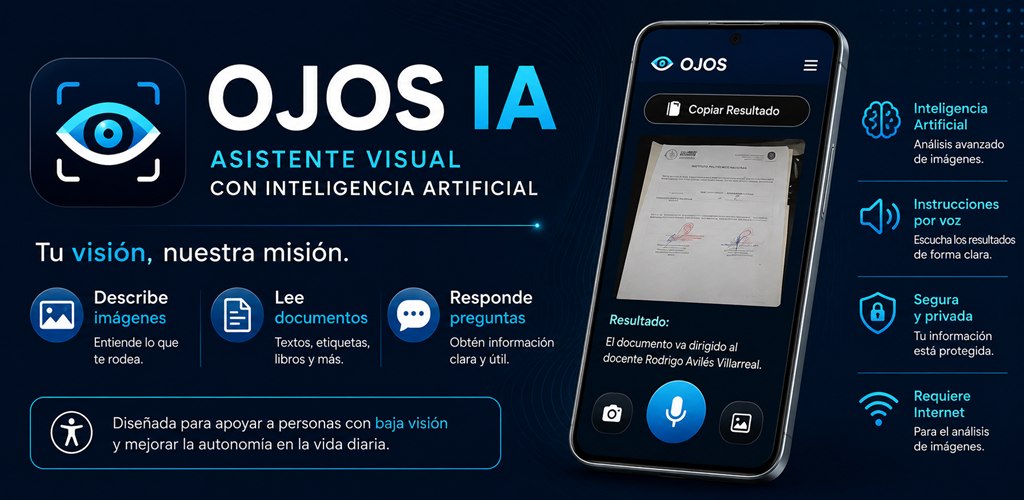
With a single photo, OJOS AI can interpret visual content and provide a clear response. It is designed for people with low vision and for anyone who needs to turn visual information into accessible information.
A high-contrast interface, large buttons, and spoken output support a wide range of everyday activities.
Interprets what appears in front of the camera.
Helps identify text, data, and printed content.
Helps identify visible information on medication packaging.
Finds specific information within an image.
Reads receipts, tickets, and small printed text.
Listen to results clearly and accessibly.
Real demonstrations of OJOS assisting with medication, academic materials, technical components, and products in everyday environments.
Capture an image or select an existing one.
AI interprets the visual content.
OJOS generates a clear and useful response.
Hear the result aloud or copy it.
Install OJOS AI from Google Play or Huawei AppGallery.
Yes. Image analysis requires an Internet connection.
Yes. The interface uses high contrast, large buttons, and spoken output.
OJOS AI is available for compatible Android devices through Google Play and Huawei AppGallery.